# SEO

SEOフレンドリーなURLに関する設定を行います。
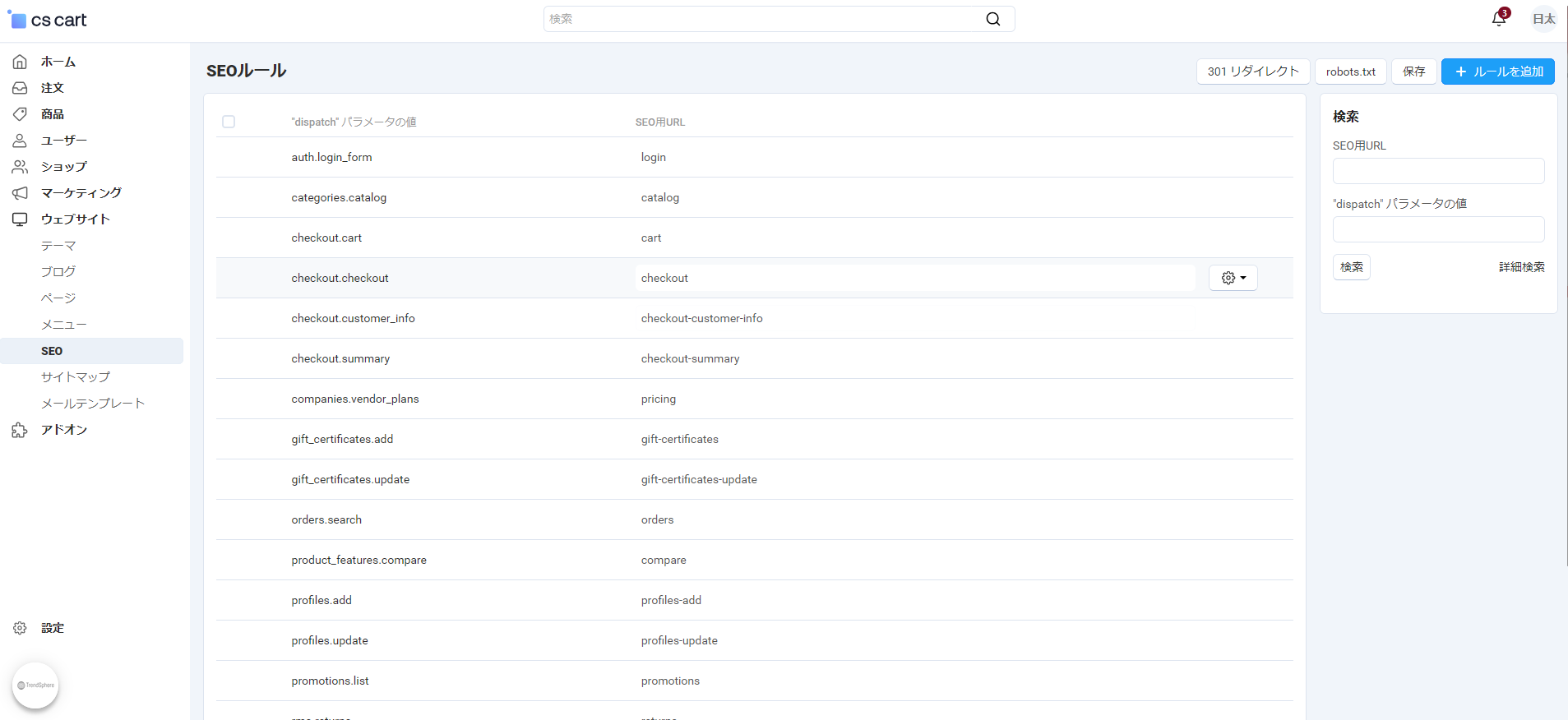
<figure><img src="/files/UjP0pG3uxVpGQdyjYVE5" alt=""><figcaption></figcaption></figure>

{% hint style="warning" %}
「SEO」アドオンが有効化されていない場合は、[**robots.txt** の編集ページ](/mall-admin/website/seo/robots_txt.md)が表示されます。
{% endhint %}

<table><thead><tr><th width="291">項目</th><th>説明</th></tr></thead><tbody><tr><td>「301 リダイレクト」ボタン</td><td>301リダイレクトの設定ページへ移動</td></tr><tr><td>「robots.txt」ボタン</td><td>robots.txtファイルの編集ページへ移動</td></tr><tr><td>「保存」ボタン</td><td>変更を保存</td></tr><tr><td>「ルールを追加」ボタン</td><td>新しいSEOルールを追加</td></tr><tr><td>"dispatch" パラメータの値</td><td>システム内部で使用されるURLパラメータ</td></tr><tr><td>SEO用URL</td><td>外部に表示されるSEOフレンドリーなURL（変更可）</td></tr><tr><td>歯車アイコン</td><td>以下のアクションを実行<br>・削除</td></tr><tr><td><strong>検索</strong></td><td></td></tr><tr><td>SEO用URL</td><td>SEO用URLを指定して検索</td></tr><tr><td>"dispatch" パラメータの値</td><td>dispatchパラメータを指定して検索</td></tr><tr><td>「検索」ボタン</td><td>検索を実行</td></tr><tr><td>「詳細検索」リンク</td><td>詳細な検索オプションを表示</td></tr></tbody></table>


---

# Agent Instructions: Querying This Documentation

If you need additional information that is not directly available in this page, you can query the documentation dynamically by asking a question.

Perform an HTTP GET request on the current page URL with the `ask` query parameter:

```
GET https://manual-admin.cs-cart.jp/mall-admin/website/seo.md?ask=<question>
```

The question should be specific, self-contained, and written in natural language.
The response will contain a direct answer to the question and relevant excerpts and sources from the documentation.

Use this mechanism when the answer is not explicitly present in the current page, you need clarification or additional context, or you want to retrieve related documentation sections.
