# お客様

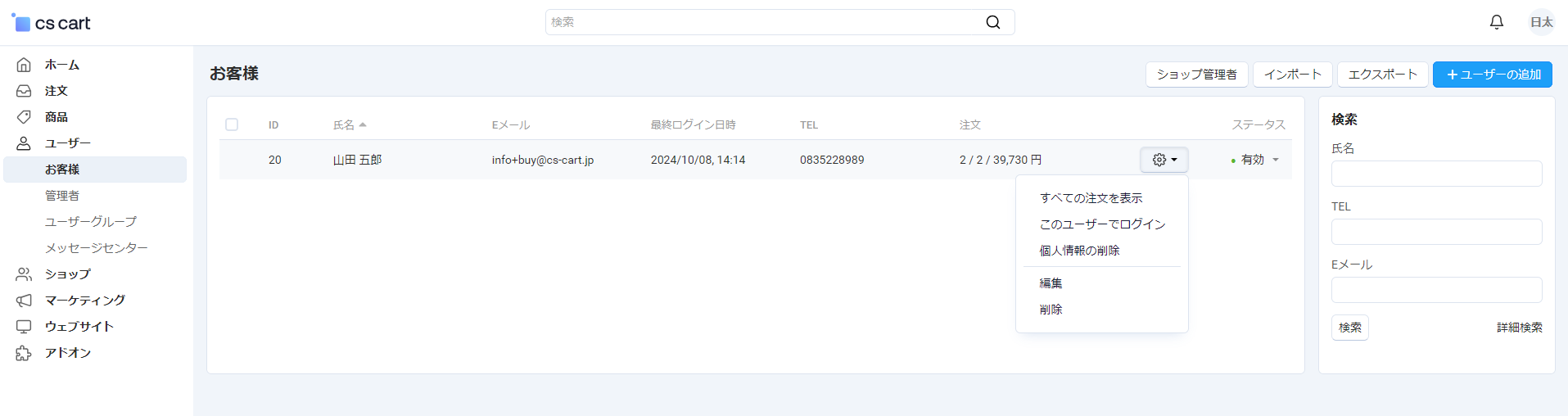
顧客の一覧ページです。

<figure><img src="https://41096298-files.gitbook.io/~/files/v0/b/gitbook-x-prod.appspot.com/o/spaces%2FK7QYyHt2kqHHD8GYgJrQ%2Fuploads%2Fgit-blob-5a70435cd023edda642f94b97ffb913ae30ec8fe%2Fimage%20(41).png?alt=media" alt=""><figcaption></figcaption></figure>

<table><thead><tr><th width="256">項目</th><th>説明</th></tr></thead><tbody><tr><td>「ショップ管理者」ボタン</td><td>ショップ管理者の一覧に移動</td></tr><tr><td>「インポート」ボタン</td><td>顧客データをインポート</td></tr><tr><td>「エクスポート」ボタン</td><td>顧客データをエクスポート</td></tr><tr><td>「ユーザーの追加」ボタン</td><td>新規顧客を追加</td></tr><tr><td>ID</td><td>顧客IDを表示</td></tr><tr><td>氏名</td><td>顧客の氏名を表示</td></tr><tr><td>Eメール</td><td>顧客のメールアドレスを表示</td></tr><tr><td>最終ログイン日時</td><td>顧客の最終ログイン日時を表示</td></tr><tr><td>TEL</td><td>顧客の電話番号を表示</td></tr><tr><td>注文</td><td>顧客の注文数と合計金額を表示</td></tr><tr><td>歯車アイコン</td><td>以下のアクションを実行<br>・すべての注文を表示<br>・このユーザーでログイン<br>・個人情報の削除<br>・編集<br>・削除</td></tr><tr><td>ステータス</td><td>顧客アカウントのステータス（有効/無効）を表示（変更可）</td></tr><tr><td><strong>検索</strong></td><td></td></tr><tr><td>氏名</td><td>氏名で顧客を検索</td></tr><tr><td>TEL</td><td>電話番号で顧客を検索</td></tr><tr><td>Eメール</td><td>メールアドレスで顧客を検索</td></tr><tr><td>「検索」ボタン</td><td>設定した条件で検索を実行</td></tr><tr><td>「詳細検索」ボタン</td><td>より詳細な検索オプションを表示</td></tr></tbody></table>


---

# Agent Instructions: Querying This Documentation

If you need additional information that is not directly available in this page, you can query the documentation dynamically by asking a question.

Perform an HTTP GET request on the current page URL with the `ask` query parameter:

```
GET https://manual-admin.cs-cart.jp/mall-admin/users/customers.md?ask=<question>
```

The question should be specific, self-contained, and written in natural language.
The response will contain a direct answer to the question and relevant excerpts and sources from the documentation.

Use this mechanism when the answer is not explicitly present in the current page, you need clarification or additional context, or you want to retrieve related documentation sections.
